For such a long time I used HostGator’s shared hosting. Over a decade…
On a trip with friends, we ended up with leftover currency from a country we wouldn’t visit again. That became an app idea. The app idea meant I needed better hosting.
HostGator worked, but deploying anything was a chore. FTP uploads, cPanel file managers, manual configs. Every time I had an idea, the deployment friction killed my momentum. I’d heard about Digital Ocean during pandemic self-teaching. Asked Gemini about migrating. It pointed me to a Droplet with Coolify—automated GitHub deployments, better pricing.
The Migration
Digital Ocean has one-click Coolify installation. Selected it during droplet creation, Coolify was running in minutes. First version of the currency app deployed that day.
The problem: Coolify’s dashboard was exposed on a public IP with basic auth. Login page discoverable via port scanning. Docker containers and API endpoints accessible from anywhere. Functional, but needed hardening.
The Setup
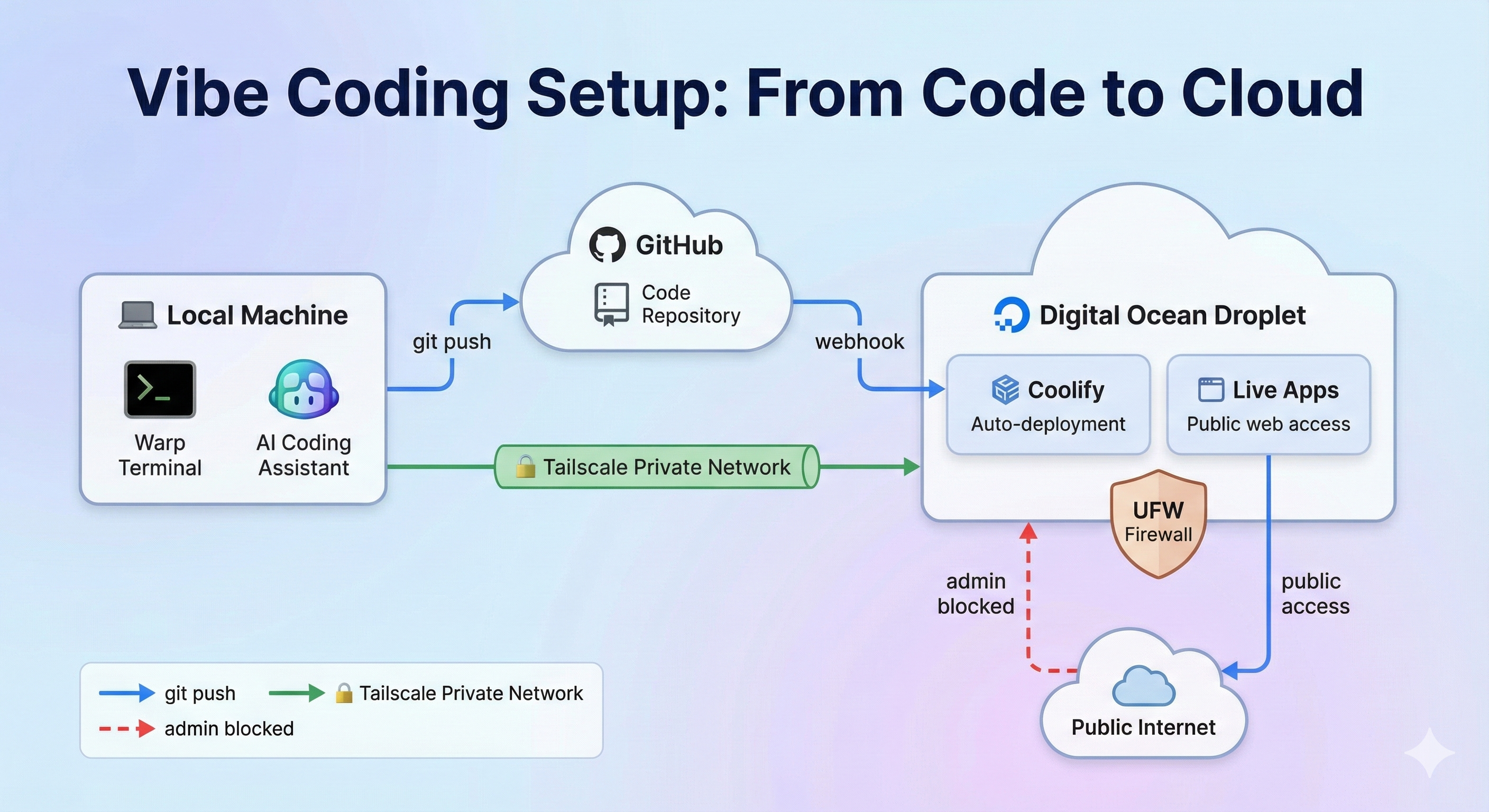
Warp terminal for AI-assisted coding and direct droplet access. Tailscale creates a private network between my devices and the droplet—dashboard and SSH only accessible through the tunnel. Coolify auto-deploys from GitHub on every push.
Code locally, push to GitHub, app is live in minutes. Admin interfaces locked to my devices.
Security
Proper firewall rules first. Then fixing Docker’s habit of bypassing them. Tailscale configuration took the longest—private network for remote access without public exposure. Locked myself out twice. Used Digital Ocean’s recovery console to fix UFW both times.
SSH key auth and aliases for instant server access. AI tools configured to work with the Coolify API while respecting security boundaries.
Why It Was Worth It
HostGator: idea → hours of manual uploading → maybe ship it.
Digital Ocean + Coolify: idea → push to GitHub → live.
That’s the difference. I ship things now. The migration took longer than expected, but it removed the friction that was stopping me from building.